Think of a designer, a writer, and a translator. They all ask the same AI tool to generate an error message for a payment failure. You have three messages, and each one feels like it's from a different company.
The model obeyed instructions. Not enough instructions were provided to it. Lack of an AI style guide is one of the most common causes for AI-written copy going off the rails, which results in lost hours every week for product teams.
In this guide, we show how you can construct an AI style guide for LLMs. You will find out what should be included in it, a seven-step process for building it, a maturity level that you can benchmark your team on, and a straightforward way to spot inconsistencies.
What Is an AI Style Guide?
An AI style guide is a brief, organized collection of writing guidelines, examples, and preferred terminology that an LLM looks at before producing any output. It explains the sound of your brand, preferred words and those to avoid, and how the tone varies depending on the context. As opposed to a traditional style guide, it is written for a machine.
Think of it like a package of information that will be given to a new writer who has gone through most of the internet but never knew about your product. The writer is very efficient and skilled. They just have to get to know your jargon, tone, and rules.
The difference between a prompt and a style guide is in their functions. A prompt asks for a certain action to be performed, for example, “Generate a tooltip for this field.” The style guide applies to everything underneath it and always remains the same. The clearer the guide, the more effective short prompts become.
Voice, Tone, and Style: Three Things Models Mix Up
Most writing guides will blend three concepts together, and you will get models mixed up when doing so.
- Voice is your consistent character.
- Tone is the way in which that character adapts to the situation, whether it be a success message or a security message.
- Style is the technical part of the process.
Each must be done separately. It is harder to rank the importance of voice rules and formatting rules when both occur in the same paragraph. They should be separated in order to prioritize them later on.
Why an AI Style Guide Is the Base of an AI Content System
AI is currently commonplace in the workplace. The 2026 State of AI report by McKinsey reveals that almost nine out of ten firms utilize AI on a regular basis within at least one business operation, while 44% report that AI is being scaled throughout their organization. Eighty percent of those surveyed reported that AI helped increase their personal productivity.
That difference is immediately evident in the writing. Everyone writes faster, but no one writes the same way. This is the point we made in Content Design Is Shifting from Writing to Building Loops.
The AI content system solves this problem by feeding the same input into AI all the time. We have four layers here:
- Guidelines. Your AI Style Guide, including voice, guidelines, and terminology.
- Context. The product, design, and approved copy that the model can access.
- Generation. The model, agent, or writing assistant that creates the text.
- Review. The checks and tests to identify errors before release.
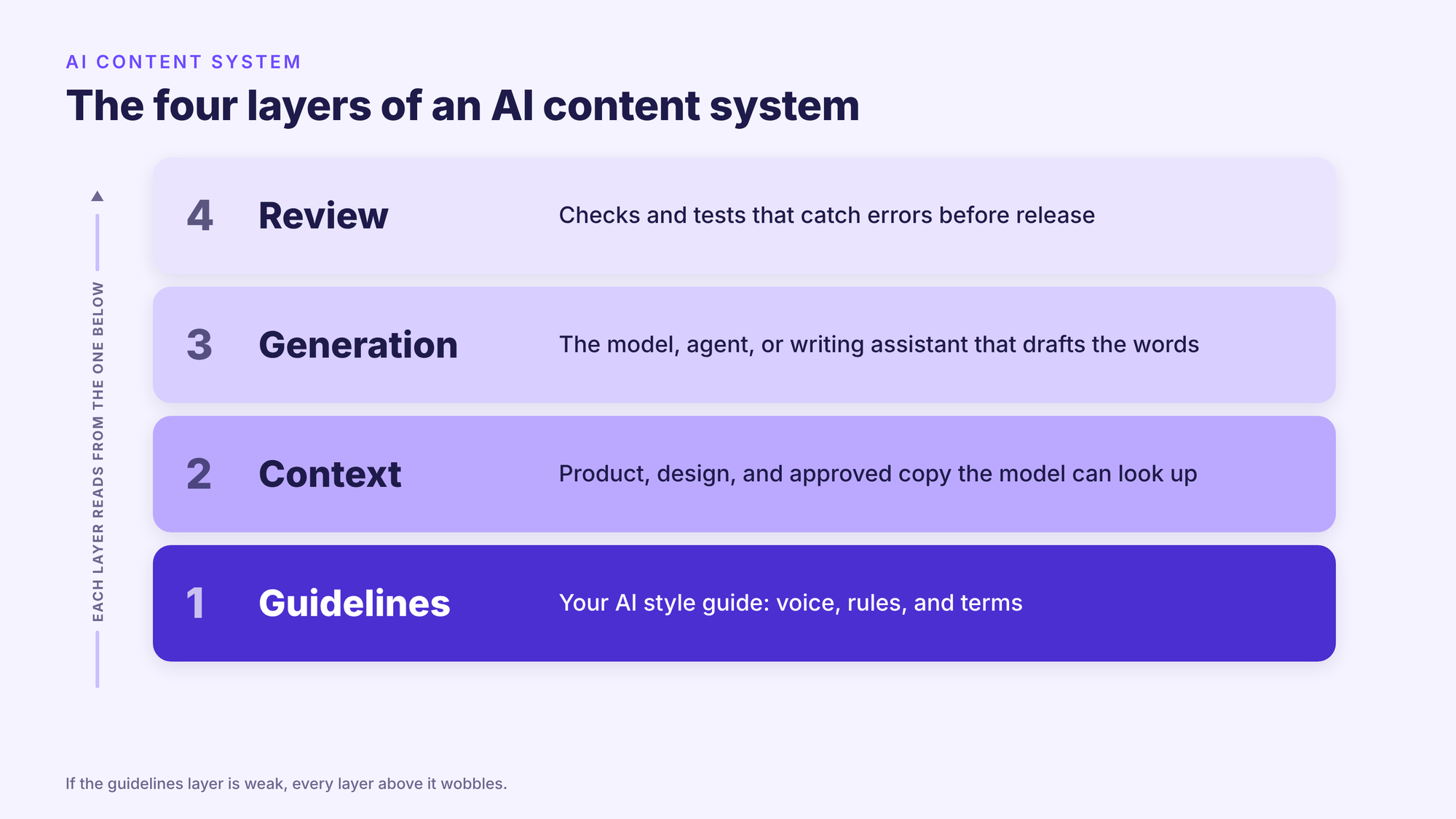
The guidelines layer is located at the bottom. When it’s not strong enough, all layers above it will be shaky. We explored this topic in detail in The Guidelines Gap. If agents writing on your behalf sound like a strange concept for you, then start with What Is Agentic Content Design?
Why LLMs Ignore Most Style Guides
Style guides were primarily designed for people. People skim, interpret, and ask their colleagues if the rule is not clear. However, the model cannot do any of these things; hence, it simply follows the most dominant pattern in front of it. There are five main issues:
- Too many pages. There is a 60-page-long PDF filled with contradicting rules, which forces the machine to figure out what it should adhere to.
- The use of vague adjectives. “Friendly but professional” can be easily used for any other brand in the world.
- Lack of examples. Machines learn more from examples rather than general tips.
- No priority. Where there are conflicts between rules, there is no way of telling which rule takes precedence.
- Wrong location. A guide in a wiki never reaches the model unless someone pastes it in.
What Goes Into an AI Style Guide
The guideline consists of seven sections. Below is what you should write in each section, along with a sample rule for you to use.
| Section | What to write | Sample rule |
|---|---|---|
| Voice traits | Three or four traits with a plain definition each. | Direct: use short words. Say “save,” not “persist.” |
| Tone by moment | How tone shifts for success, errors, warnings, and onboarding. | Errors: say what happened and what to do next. Never blame the user. |
| Terminology | Approved terms, banned terms, and product names. | Use “workspace.” Never use “project space.” |
| Grammar and format | Casing, punctuation, dates, and numbers. | Use sentence case for buttons. Use US date format. |
| UI patterns | Rules for buttons, tooltips, empty states, and errors. | Buttons start with a verb and run one to three words. |
| Do and don’t pairs | On brand and off brand samples side by side. | See step two below. |
| Edge cases | Legal, sensitive, and localization notes. | Never promise refunds in product copy. |
An excellent first draft would fit in two to four pages. However, if yours takes up more than four pages, try breaking it up into core and separate files for each surface.
Step 1: Collect Your Best Copy
Begin with facts. Extract 30-50 strings that you are proud of from throughout the product. This should include buttons, error messages, empty states, email messages, and maybe one or two help articles. Then extract 10 strings that you wish you could delete.
Look at the strong group and jot down their similarities. Perhaps each sentence begins with a verb. Or perhaps no sentence uses an exclamation mark. These are your initial rules, and the weak sentences are your initial “don’ts.”
If your copy exists in Figma, a copy library makes this process more efficient since all the approved strings will be kept in one single spot and not in hundreds of different documents. This is illustrated in our content consistency page.
Step 2: Describe Your Voice With Traits and Paired Examples
Choose three to four traits. Define them in one line each, and give an example of an on-brand trait and an off-brand trait for each. These are what the model learns from.
This is how the “Direct” trait would be structured:
- Definition: The problem and its solution are stated in the first sentence.
- On brand: “Your file did not upload. Please try again.”
- Off brand: “Oops! Something may have happened during your upload process.”
Repeat for every attribute. Include at least two pairs for your most common surface, typically errors and buttons. The models will likely follow the nearest examples they find, so make sure these are examples you would like to see reproduced 10,000 times.
Step 3: Write Rules as Short, Testable Instructions
“Be concise” cannot be evaluated. “Ensure that error messages are less than 15 words long.” Formulate each rule so someone could verify its compliance with a yes/no answer.
Then classify your rules into three levels:
- Must. Absolutely never violated. Consider prohibited words, legal language, and brand names.
- Should. Always followed unless a solid case can be made against them. Consider sentence length and shifting tone.
- May. Allowed options. Like a contraction or friendlier emoji in a chat thread.
Place the Must rules first. Usually, guides require between 25 and 40 rules.
Step 4: Lock Down Your Terminology
Vocabulary creates more drift than tone. One group uses “sign in,” another uses “log in,” and yet another uses “login.” The model will use all three unless you pick one.
Create a simple table having four columns: approved word, definition, avoid using, and notes. Insert your product and feature names in this table. Also include filler words that give an AI-generated text a similar sound to filter out these words. You should also consult with your support team for actual customer terminology.
Step 5: Add Context for Each Surface
One voice serves various purposes in different places, and a model must be aware of where its words will fall. Include a small block for each major surface:
- Buttons: Start with a verb, include one to three words, and omit the period.
- Error messages: Describe the problem and the next step within 15 words.
- Empty states: State the value and provide an action.
- Tooltips: Write one sentence without jargon and don’t repeat the label.
- Notifications: Start with the information and maintain a calm tone.
Restrictions that come from the design should be included. So include length restrictions and mark the strings for translation.
Step 6: Package It So the Model Can Read It
Machines understand structure well. Type in plain text or Markdown with structure, one rule per line, and bullets. Omit images, merged cells in tables, and decorative PDF files. Place the Must rules first, followed by examples and terms.
Now choose the location of the guide. There are three choices:
- System prompt. Ideal for short guides of less than a few thousand words. All requests include the entire guide.
- Retrieval. Best for longer guides. The model extracts the parts relevant to the task at hand.
- Connected tools. Best for collaborative environments. AI tools access the same approved content and guidelines from a single source rather than from pasted material.
The third option is crucial because the pasted guides get out of date quickly. The style guide helps the agent to find the tone for communication but can’t tell the agent whether the string is already approved, active in many languages, or limited to a certain number of characters.
This issue has led us to develop the Frontitude MCP integration that connects Claude, ChatGPT, Cursor, and others with your guides.
Step 7: Test, Score, and Revise
An untested guide is an educated guess. Construct a testing set containing 20-30 prompts that include your key surface forms. Include some challenging examples, such as a legal warning or non-payment. Test those prompts on your system with the guide active.
Score each output with a short checklist:
- Does it follow all the rules of Must?
- Does it employ only approved terminology?
- Does it have the right voice characteristics for this situation?
- Would another member of the team ship it without editing?
Monitor pass rate. If a rule fails more than twice, revise the rule or add an additional example. Perform the test again every time there is a change to the guide or the model used, since the new model may interpret the guide differently.
The AI Style Guide Maturity Model
What’s your team’s current position? Apply this framework to determine yours and what you should do next.
| Level | What it looks like | Main risk | Next move |
|---|---|---|---|
| 1. Ad hoc | Everyone writes their own prompts | Three voices in one product | Collect your best copy and draft traits |
| 2. Shared doc | One guide exists, but people paste it by hand | Stale copies and skipped rules | Rewrite it as short, testable rules |
| 3. Structured guide | Tiered rules, paired examples, and a term list | No proof that it works | Build a test set and score outputs |
| 4. Connected system | Guide, approved copy, and tests feed every AI tool | Rules that drift as models change | Rerun tests on every model change |
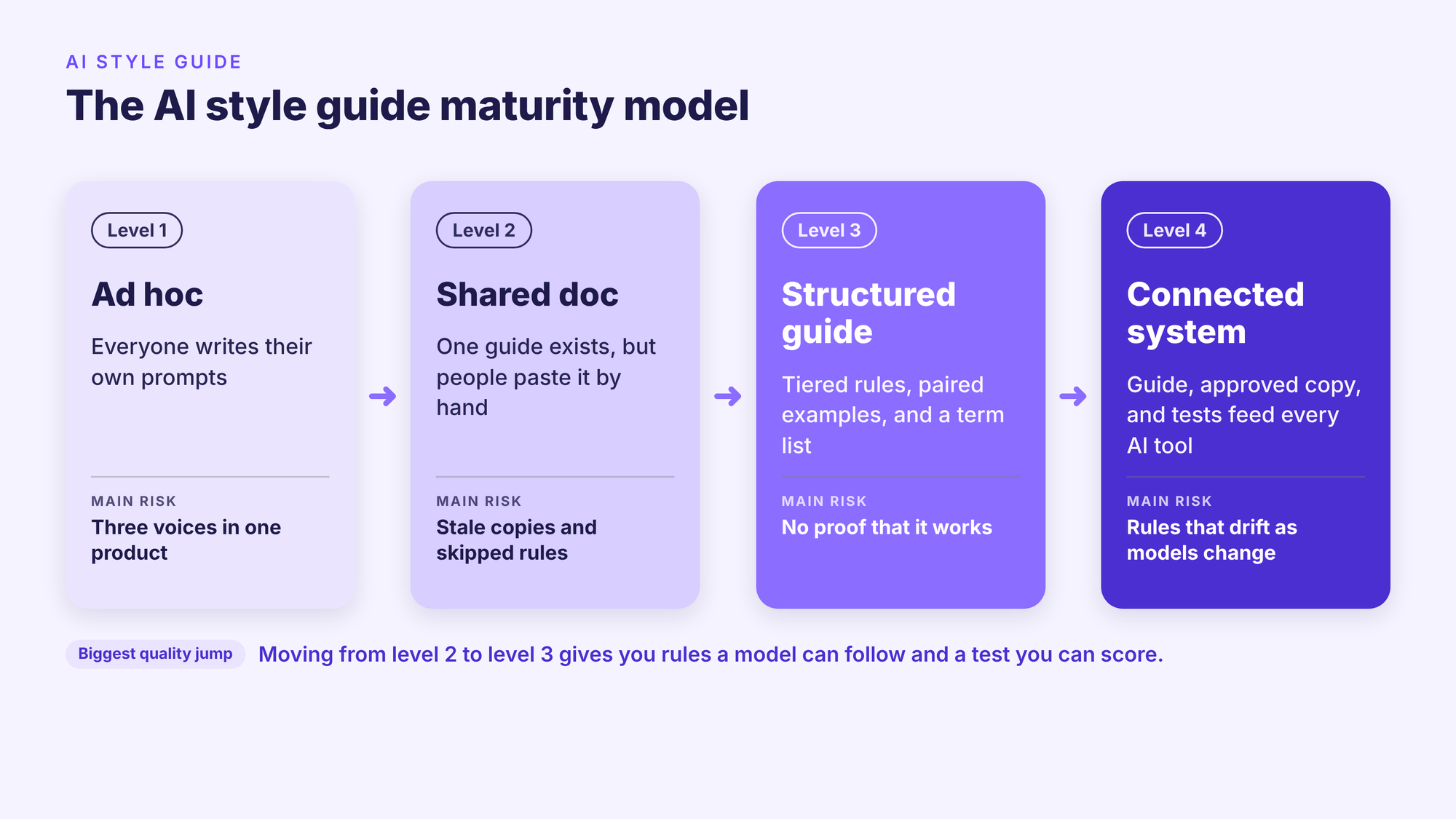
If you are sitting at level one or two, then you are in good company. Level three is the most drastic improvement and may require a week of dedicated practice.
AI UX Writing in Practice: A Before and After
This is an example of how the AI style guide modifies an actual draft. Suppose a group contacts an AI system to request a message after a failed transaction.
- Without any assistance: “Oops! It seems we couldn't go through with your payment request. Kindly recheck the information and try again.”
- With some assistance: “Your payment could not be completed successfully. Verify your card details and retry.”

The second version is concise and devoid of redundancy. It abides by the rules given in steps two, three, and five. The distinction may appear insignificant on a single string but is quite significant when considering 5,000 strings.
AI for UX writing is most effective when the AI is used as a drafting partner. The writer is still the one who decides what goes live, but he or she stops making the same five errors each day. Our Frontitude AI helps designers get suggestions and feedback as they write in Figma.
Common Mistakes to Avoid
Teams run into the same traps. Watch for these:
- Creating the guide one time and never testing it.
- Inserting the brand book, which talks about the values but not about the guidelines.
- Not having pairs of examples.
- Having five copies of the guide in five different locations.
- Ignoring localization, thus making the guidelines apply only in English.
- Considering the guide to be a project with an end date rather than a living document with an owner.
Name an owner and go through the guide every quarter. If the reviewer finds the same problem twice, make the solution a rule.
Ready to Build Yours?
Creating an AI style guide is worth it the first week you have one. Begin modestly. Gather 30 solid examples, create three qualities with pairs of examples, and perform 10 prompt tests. You will notice which areas your guidelines are deficient in immediately.
Are you looking for assistance? We can definitely help you. See how Frontitude AI ensures that your guidelines, approved copy, and AI tools are in harmony. Contact us at hi@frontitude.com or request a demo, and we will set up your first AI content management system together.
FAQs
What is an AI style guide?
An AI style guide is a small document of voice guidelines, examples, and approved terms that an LLM ingests prior to writing. It enables AI writing software to generate copy that reflects your brand and remains consistent across teams, technologies, and languages.
How do you write a style guide for AI?
Gather your strongest draft, define voice elements using example pairs, create short rules to test, and list accepted words. Create rules for each surface, format in plain Markdown, and test on 20 to 30 prompts.
What should an AI style guide include?
Voice traits, tone according to the situation, allowed phrases/terms and not allowed, grammar guidelines, interface guidelines, good/acceptable samples and bad samples, and edge cases including legal language. Keep the core document to four pages so that all models abide by it.
How long should an AI style guide be?
The guide should be about 2 to 4 pages long, which means 25-40 rules at maximum. Too lengthy guides force the rules to compete, and the model will use the most prevailing pattern. Any additional information can be split between files by surface.
Where can I get help building an AI style guide?
Frontitude collaborates with design product teams around the globe and provides an AI content system, which in many cases starts with an AI style guide. Contact us at hi@frontitude.com or request a demo to start building one.